Singlet
I wanted a pair of buttons for two people who are close. You keep one and give the other to your partner, a close friend, or someone in your family.
Plug both into computers running Singlet and they find each other. When the other person is available, your button glows. Press yours to ring theirs.
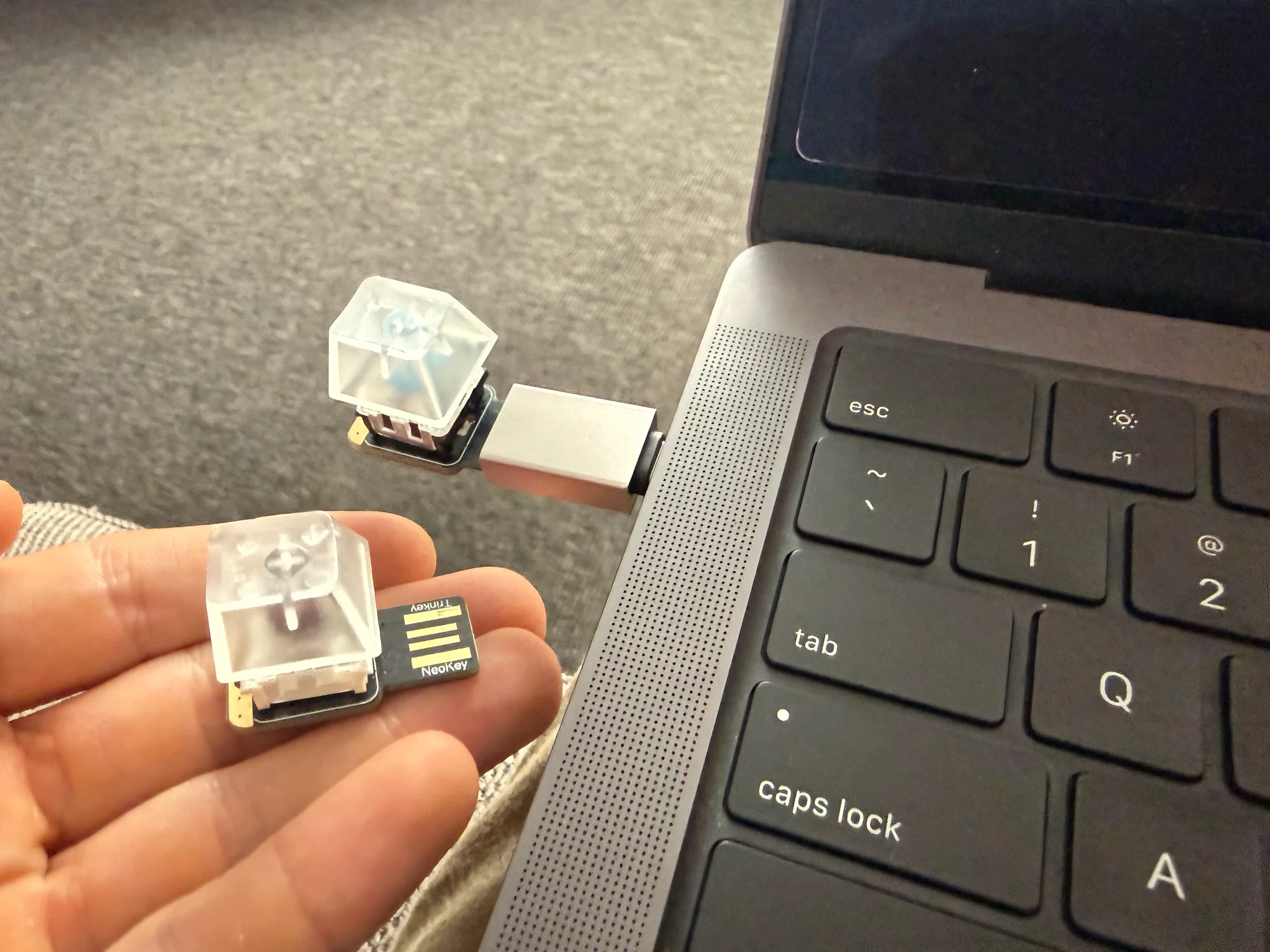
Each button always connects to the same person. They press to answer, and the computers carry the audio.
I also wanted to move a Singlet to another computer without setting up the pair again. The computer could provide power, sound, and networking, but the pair's identity had to stay with the buttons.
Using it
I wanted the learning curve to be trivial, so I kept the same two gestures throughout. Press to ring or accept a call. Double press to cancel an outgoing call, reject an incoming one, or hang up. During a call, a press toggles mute. The light shows the current state:
| Light | Means | Press | Press ×2 |
|---|---|---|---|
| dark | offline | — | — |
| glow | available | call | — |
| slow pulse | dialing… | — | cancel |
| fast blink | call incoming | answer | decline |
| breathing | in call | mute | hang up |
| dim red | muted | unmute | hang up |
| 2 pulses → dark | busy | — | — |
| flash → dark | missed | — | — |
You can have several Singlets attached to one Mac, but only one call can be active. During a call, the other pairs go dark on both sides. I wanted the light to mean that you can actually start a conversation.
Hardware
I built this version with two Adafruit NeoKey Trinkeys. Each board has a SAMD21 microcontroller, a USB connector, a NeoPixel, and a footprint for a mechanical switch. I soldered a switch onto each board and added clear keycaps so the light stays visible.
With 32 KB of RAM and a 48 MHz processor, I keep the firmware focused on the button, the light, and the keys. Audio and networking run on the Mac.

The firmware has a portable C core for identity and device requests, with an Arduino sketch that connects it to the board's peripherals.
On the Mac, I wrote a Rust daemon called singletd. It watches for attached Singlets and manages the peer connection, call state, and audio devices.
The NeoKeys control the voice line. Audio travels between the hosts. Full size.
USB contract
With the call logic on the Mac, the NeoKey needs only a small set of messages. The Mac sends requests and gets typed responses, while button presses arrive independently as events.
The Rust virtual device models the request handler with this trait:
pub trait ContractDevice {
	fn handle(
		&mut self,
		req: &Request,
	) -> Result<Response, contract::messages::DeviceError>;
}
On the physical NeoKey, dev_handle implements the request handler in C. Both use the same wire format: a four-byte, little-endian length followed by a CBOR payload over USB.
These are the messages used after provisioning, with serialization attributes omitted:
pub enum Request {
	Hello,
	GetWrapped,
	Unseal { blob: Vec<u8>, context: String },
	Sign { challenge: [u8; CHALLENGE_LEN] },
	SetLed { state: LedState },
}

pub enum DeviceEvent {
	Button(ButtonKind),
}

pub enum Uplink {
	Response(Response),
	Event(DeviceEvent),
}
On the Mac, I use one state machine to interpret those gestures and set the corresponding light:
Main call transitions. Full size.
Double press also cancels an outgoing call or declines an incoming one. Call timeouts return to Found with a brief flash. Losing the peer returns every state to NotFound, including an active call, and presses while dark do nothing.
This keeps call state out of the firmware. The NeoKey reports presses and renders the light pattern requested through SetLed.
Two keys
Moving a Singlet to another Mac should not change who it connects to. I wanted the new host to get everything it needs from the attached button.
I give each Singlet a root key, generated on the device during provisioning. The firmware can sign a challenge with this key, but has no request that exports it.
Iroh runs on the Mac, though, and needs a private key there to establish the connection. Using the root key would mean taking it off the device. So I use a separate endpoint key for the network identity.
That endpoint key also travels with the Singlet. Keeping it stable lets the other half use Iroh's existing discovery when I switch computers.
The provisioning tool generates the endpoint key. The NeoKey encrypts it with a key derived from its root seed and stores the result in flash. This is the wrapped key.
On attachment, the daemon reads the wrapped key and asks the NeoKey to decrypt it. The daemon keeps the result in memory for the connection, without saving it to disk.
| Information | Where it lives |
|---|---|
| Root private key | On the NeoKey, behind the firmware contract. |
| Wrapped endpoint key | In the NeoKey's flash storage. |
| Unwrapped endpoint key | In the daemon's memory while attached. |
| Other half's public identities | In the NeoKey's peer record. |
I call the host stateless in this limited sense. It still has software, settings, and logs, but needs no saved copy of the pair's identity.
Pairing
I provision the two boards together with a separate factory tool. Each board gets its own keys and stores the other half's public identities in a peer record:
pub struct PeerRecord {
	pub peer_root_pub: [u8; KEY_LEN],
	pub peer_endpoint_pub: [u8; KEY_LEN],
	pub pair_id: [u8; 32],
}
KEY_LEN is 32 bytes. I use peer_endpoint_pub to check the network identity and peer_root_pub to verify signatures from the other NeoKey.
The pair ID is a BLAKE3 hash of both root public keys in sorted order. I derive the glow colour from it, so both buttons get the same colour without another setting. Mute uses dim red instead.
ProvisionCommit locks the peer record and wrapped key against further changes. Pairing the button with someone else requires a wipe and new provisioning, which the ordinary daemon does not perform.
Proving possession of the root key
The Mac needs the Iroh key to connect, which means it could keep a copy after the NeoKey is unplugged. Checking the network identity alone would let that Mac reconnect. I also require a fresh signature from the root key for each new connection.1
First, each Mac checks the connection's authenticated Iroh endpoint ID against the saved peer_endpoint_pub. It rejects a mismatch before asking its NeoKey to sign anything.
My Mac then generates a challenge using 32 bytes from the operating system's random source. This is the nonce, labelled c below. Your Mac passes it to your NeoKey through Request::Sign.
The NeoKey signs those bytes with its root private key using Ed25519. It returns a 64-byte signature, s, which your Mac sends back to mine. The private key stays on the NeoKey.
One direction of the mutual proof. Full size.
My Mac verifies the signature against its original challenge and your root public key. I use the public key saved during pairing, so the connection cannot choose which key I trust.
The nonce can be public, but it must be fresh and unpredictable. A signature recorded during an earlier connection will not verify against the new challenge. The copied endpoint key is no help with signing it.
Your Mac checks my half with its own challenge too. Each host marks its peer as found and turns on the glow after successful authentication. A failed proof or a timeout drops the connection.
The exchange uses two messages, with serialization attributes omitted here:
pub enum AuthFrame {
	Challenge([u8; CHALLENGE_LEN]),
	Prove([u8; SIGNATURE_LEN]),
}
This proves access to the root key when we connect, without proving the device's location or continued presence during the call. The signature covers only the challenge, with no cryptographic binding to the QUIC session transcript. I still have to trust the host with audio, the endpoint key, and requests to the attached device. The NeoKey also has no secure element, so this design does not protect against physical key extraction or replacement firmware.
Connecting with Iroh
Having the right keys does not give the computers a route to each other. Either person might be behind a home router, an office firewall, or the mobile operator's NAT. I wanted to hand someone a button without asking them to configure port forwarding.
I use Iroh to find the peer and establish a connection, with a relay available when a direct route fails. Tailscale's NAT traversal article has more background on the packet exchanges below.
Address discovery
Suppose my Mac sends from 192.168.1.20:50000. Your Mac cannot reach that private address across the internet. My router rewrites it to something like 203.0.113.10:42000 and keeps a mapping to route replies back to me.
The router's firewall can still reject incoming packets even when a mapping exists. Address mapping and packet filtering are separate behaviours, as RFC 4787 describes.
To learn that public address, Iroh uses QAD, or QUIC Address Discovery. It sends a probe to a server, which reports the source address it saw:
Example addresses. QAD sees the router's public mapping for this UDP socket. Full size.
This is the job often associated with STUN. Singlet uses Iroh 1.0.3, which uses QAD instead. The probe has to come from the UDP socket used for the connection, since another socket could get a different mapping.
UDP hole punching
The Macs need somewhere to exchange addresses before they can try a direct route. Singlet enables mDNS for peers on the same local network. Across the internet, Iroh's DNS lookup finds the peer's home relay from its stable endpoint ID. The default record publishes that relay, without listing the host's direct IP addresses.
Through the relay, the Macs can establish an encrypted QUIC connection and exchange possible direct addresses. Iroh then sends UDP probes from both sides. If both routers keep stable mappings and allow replies from contacted addresses, those probes can open a direct path:
A simplified exchange with stable public mappings and filters that allow replies. Iroh then validates the direct path. Full size.
My first packet may be dropped at your router, but sending it makes my router accept a reply from you. When your probe arrives, it can pass through. Your outgoing probe does the same on your side, so my next packet can reach you. The two routers' filter entries need to overlap in time for this to work.
Iroh handles the probes and retries, then validates the direct path before using it for traffic. The relay can carry the call during this process. Changing the route keeps the same QUIC connection, so I do not have to restart the call when a direct path becomes available.
Changing ports
The example above depends on my router keeping the same public mapping when I send to different destinations. Some routers allocate a different port for each destination:
The public IP stays the same in this example. The destination changes the port. Full size.
With this destination-dependent mapping, the address reported by QAD may be wrong for the peer. Restrictive filters can then prevent the probes from meeting, especially when both routers behave this way.
Iroh can also use reachable local or IPv6 addresses. IPv6 avoids IPv4 address translation, although firewall rules still apply. I also enable Iroh's port mapper in Singlet's native build, so it can request a UDP mapping through UPnP, NAT-PMP, or PCP.
The gateway may refuse or not support that request. With carrier-grade NAT, a mapping on my home router also leaves the operator's outer NAT untouched. Double NAT does not always prevent hole punching, but the probes have to pass both sets of mappings and filters.
Relay fallback
If direct access fails, the peers keep using the relay. Native Iroh carries the encrypted QUIC packets through a WebSocket secured with TLS over TCP port 443:
The diagram uses one shared relay for clarity. The relay forwards encrypted packets. Full size.
This can connect the pair even when a network blocks UDP entirely. It still needs a reachable relay and permission for WebSockets, which some networks block despite allowing ordinary HTTPS traffic. Iroh's network guide describes those requirements.
The relay cannot decrypt the call, but it adds a detour and puts the audio over TCP. A lost TCP segment makes newer audio wait for retransmission, even though I am sending QUIC datagrams inside that connection. For a live conversation, I would rather lose a short bit of audio than delay everything behind it.
Audio
Call controls use reliable QUIC streams. I encode voice with Opus in 10 ms frames and send it in QUIC datagrams. On a direct UDP path, a lost packet does not hold up the next one.
The receiving Mac reorders packets in a jitter buffer with a 60 ms target. Opus fills short gaps when packets are missing. I also limit the audio queues so a brief stall cannot leave us listening to old audio.
The Mac handles microphone and speaker changes, plus echo cancellation for calls through speakers. Audio devices open when a call starts and close when it ends. I am still working on the voice experience.
Get your pair
With Singlet firmware on both boards and the factory CLI installed, plug both into the same Mac, stop singletd if it is running, then provision and pair them:
singlet-factory provisionInstall the host software on both Macs. Keep one button and give the other away.
Footnotes
-
Singlet uses a custom mutual challenge-response exchange over QUIC. OAuth DPoP binds tokens to proofs in HTTP requests and is a separate protocol. ↩